
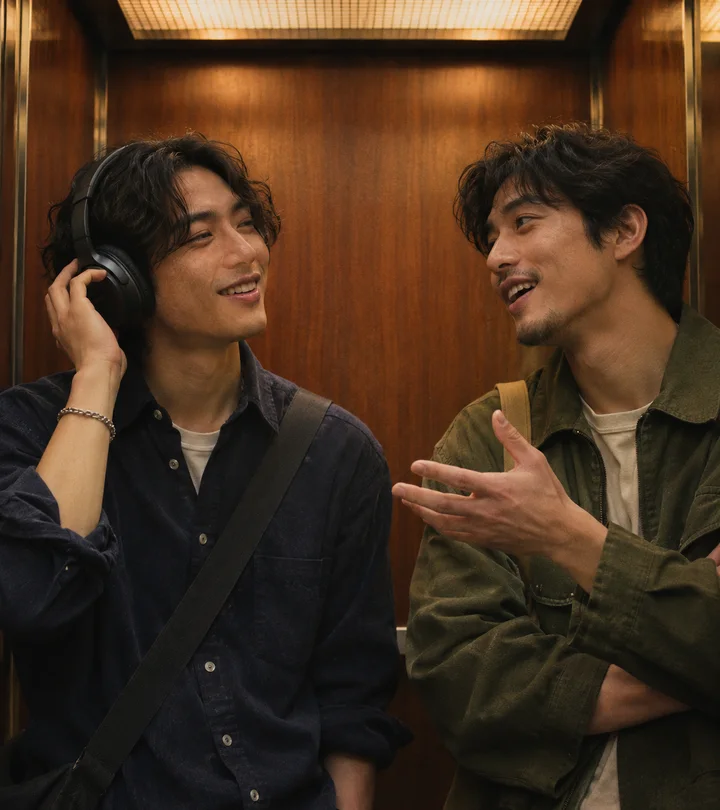
The trend takes a small moment from (500) Days of Summer and re-casts it with two photos: one person wearing headphones, another who recognizes the music and speaks. The joke is in the turn — the listener lifts the headphones and reacts. That is the whole format, which is why it spreads: two roles, one location, one gesture, no dialogue to translate. For the phrase itself, see the meme explainer.
Three ways people make the clip
Film it. A phone, a lift or a plain wall, and two consenting people. This is free and produces a native vertical clip, but you need a location and a take where the timing works.
Use an in-app template. Short-video apps add templates when a sound takes off. Search the trend name in the app, check that the template accepts two photos, and export using the platform's own audio. It is quick, but you inherit that app's watermark, aspect ratio and account requirement.
Generate it from two photos. The I Love The Smiths AI video generator takes one portrait per role and returns a 15-second 9:16 vertical HD MP4 by default (a 14-second 16:9 landscape export is also available), with the fixed lift, gesture, speaking turns and reference sound. Both exports are watermark-free. It needs sign-in and credits; the workflow guide lists the steps and the free alternatives guide lists the no-cost routes.
Posting the vertical export
Short-form feeds are built for 9:16, and that is now the default export: both faces sit in the central safe area with headroom for the "I said I love The Smiths" caption. If you choose the 16:9 landscape option instead, do one of three things in your editor: crop to the two faces and reframe around the head turn, place the wide clip on a blurred or coloured 9:16 background with captions above and below, or letterbox it and use the free space for the caption. The third option keeps both people in frame with the least work.
Whichever you choose, keep captions away from the bottom interface area, keep both faces inside the central safe zone, and watch the whole clip before posting. AI motion can drift in likeness, hair, clothing or hand position — the turn is the frame most worth checking. Add a short on-screen label that the clip is AI-generated; several platforms ask for that disclosure on realistic synthetic media.
Before you post
- Permission from both adults whose faces appear in the two source photos.
- Audio that is cleared for the platform where you publish; a famous recording is not automatically licensed.
- Honest labelling: do not present a generated performance as a real event or an endorsement.
- A local copy of the MP4. On this site the finished file stays downloadable with no deadline.
- A quick check of the platform's current synthetic-media and watermark rules.
Common questions
Is the I Love The Smiths AI trend free to join?
Filming it yourself or using a platform template costs nothing. A two-photo generator is a paid product: on this site one video costs $7.90 and requires sign-in.
Which app has the trend template?
Templates come and go inside TikTok, Reels and Shorts. Search the trend name in the app you already use and check the template's current preview rather than relying on a third-party list.
Does the generator export a vertical 9:16 video?
Yes. A 15-second 9:16 vertical HD MP4 is the default, delivered without a watermark and ready for TikTok, Reels and Shorts. A 14-second 16:9 landscape export is still available if you prefer the wider sample look.
Can I use the original song in my post?
Check the audio library inside the platform you are posting to and use a cleared version. Rights differ by platform and change over time, so verify there rather than assuming a downloaded track is safe.
This guide describes a general short-form workflow and this site's published output. Platform templates, prices and audio licensing change; verify them in the app before posting. Last reviewed November 2026.